
Element Call



The world's first 🌐 decentralized and 🤝 federated video conferencing solution powered by the Matrix protocol.
📌 Overview
Element Call is a native Matrix video conferencing application developed by Element, designed for secure, scalable, privacy-respecting, and decentralized video and voice calls over the Matrix protocol. Built on MatrixRTC (MSC4143), it utilizes MSC4195 with LiveKit as its backend.

You can find the latest development version continuously deployed to call.element.dev.
Note
For prior version of the Element Call that relied solely on full-mesh logic, check
full-meshbranch.
✨ Key Features
✅ Decentralized & Federated – No central authority; works across Matrix
homeservers.
✅ End-to-End Encrypted – Secure and private calls.
✅ Standalone & Widget Mode – Use as an independent app or embed in Matrix
clients.
✅ WebRTC-based – No additional software required.
✅ Scalable with LiveKit – Supports large meetings via SFU
(MSC4195: MatrixRTC using LiveKit backend).
✅ Raise Hand – Participants can signal when they want to speak, helping to
organize the flow of the meeting.
✅ Emoji Reactions – Users can react with emojis 👍️ 🎉 👏 🤘, adding
engagement and interactivity to the conversation.
🚀 Deployment Options
Element Call can be packaged in two ways:
Full Package – Supports both Standalone and Widget mode. Hosted as a static web page and accessed via a URL when used as a widget.
Embedded Package – 🚧 Coming Soon: Designed for Widget mode only. Bundled with a messenger app for seamless integration. This is the recommended method for embedding Element Call into a messenger app.
Standalone mode

In Standalone mode Element Call operates as an independent, full-featured video conferencing web application, allowing users to join or host calls without requiring a separate Matrix client.
Widget mode embedded in Messenger Apps

Element Call can be embedded as a widget inside apps like Element Web or Element X (iOS, Android), bringing MatrixRTC capabilities to messenger apps for seamless decentralized video and voice calls within Matrix rooms.
Important
Embedded packaging is recommended for Element Call in widget mode!
🛠️ Self-Hosting
For operating and deploying Element Call on your own server, refer to the Self-Hosting Guide.
🧭 MatrixRTC Backend Discovery and Selection
For proper Element Call operation each site deployment needs a MatrixRTC backend setup as outlined in the Self-Hosting. A typical federated site deployment for three different sites A, B and C is depicted below.

Backend Discovery
MatrixRTC backend (according to
MSC4143)
is announced by the homeserver's .well-known/matrix/client file and discovered
via the org.matrix.msc4143.rtc_foci key, e.g.:
"org.matrix.msc4143.rtc_foci": [
    {
        "type": "livekit",
        "livekit_service_url": "https://someurl.com"
    },
]
where the format for MatrixRTC using LiveKit backend is defined in
MSC4195.
In the example above Matrix clients do discover a focus of type livekit which
points them to a Matrix LiveKit JWT Auth Service via livekit_service_url.
Backend Selection
- Each call participant proposes their discovered MatrixRTC backend from
org.matrix.msc4143.rtc_fociin theirorg.matrix.msc3401.call.memberstate event. - For LiveKit MatrixRTC backend
(MSC4195),
the first participant who joined the call defines via the
foci_preferredkey in theirorg.matrix.msc3401.call.memberwhich actual MatrixRTC backend will be used for this call. - During the actual call join flow, the LiveKit JWT Auth Service provides the client with the LiveKit SFU WebSocket URL and an access JWT token in order to exchange media via WebRTC.
The example below illustrates how backend selection works across Matrix
federation, using the setup from sites A, B, and C. It demonstrates backend
selection for Matrix rooms 123 and 456, which include users from different
homeservers.

🌍 Translation
If you'd like to help translate Element Call, head over to Localazy. You're also encouraged to join the Element Translators space to discuss and coordinate translation efforts.
🛠️ Development
Frontend
To get started clone and set up this project:
git clone https://github.com/element-hq/element-call.git
cd element-call
yarn
To use it, create a local config by, e.g.,
cp ./config/config.devenv.json ./public/config.json and adapt it if necessary.
The config.devenv.json config should work with the backend development
environment as outlined in the next section out of box.
Note
Be aware, that this
config.devenv.jsonis exposing a deprecated fallback LiveKit config key. If the homeserver advertises SFU backend via.well-known/matrix/clientthis has precedence.
You're now ready to launch the development server:
yarn dev
Backend
A docker compose file dev-backend-docker-compose.yml is provided to start the
whole stack of components which is required for a local development environment:
- Minimum Synapse Setup (servername:
synapse.localhost) - LiveKit JWT Service (Note requires Federation API and hence a TLS reverse proxy)
- Minimum TLS reverse proxy (servername:
synapse.localhost) Note certificates are valid for at least 10 years from now - Minimum LiveKit SFU Setup using dev defaults for config
- Redis db for completeness
These use a test 'secret' published in this repository, so this must be used only for local development and never be exposed to the public Internet.
Run backend components:
yarn backend
# or  for podman-compose
# podman-compose -f dev-backend-docker-compose.yml up
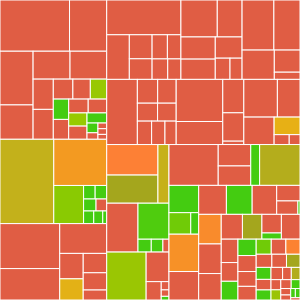
Test Coverage
Add a new translation key
To add a new translation key you can do these steps:
-
Add the new key entry to the code where the new key is used:
t("some_new_key") -
Run
yarn i18nto extract the new key and update the translation files. This will add a skeleton entry to thelocales/en/app.jsonfile:{ ... "some_new_key": "", ... } -
Update the skeleton entry in the
locales/en/app.jsonfile with the English translation:{ ... "some_new_key": "Some new key", ... }
📖 Documentation
Usage and other technical details about the project can be found here:
📝 Copyright & License
Copyright 2021-2025 New Vector Ltd
This software is dual-licensed by New Vector Ltd (Element). It can be used either:
(1) for free under the terms of the GNU Affero General Public License (as published by the Free Software Foundation, either version 3 of the License, or (at your option) any later version); OR
(2) under the terms of a paid-for Element Commercial License agreement between you and Element (the terms of which may vary depending on what you and Element have agreed to). Unless required by applicable law or agreed to in writing, software distributed under the Licenses is distributed on an "AS IS" BASIS, WITHOUT WARRANTIES OR CONDITIONS OF ANY KIND, either express or implied. See the Licenses for the specific language governing permissions and limitations under the Licenses.